Updated November 2026 · small business · about 15 minutes to read
At a glance
A business website is four separate things that must all keep working: a domain name, hosting, the site itself and, usually, email on the same domain. Most website emergencies come down to one of them lapsing or being changed without anyone noticing. Knowing which is which makes quotes, handovers and fault-finding much simpler.
The short version: the domain is yours, so it should be registered in your name. Hosting is the rented space the site lives on. We build plain, fast sites that need very little upkeep, and the upkeep that remains is a short monthly checklist. If anything goes wrong, work through the “site is down” checklist in section 6 before calling anyone.
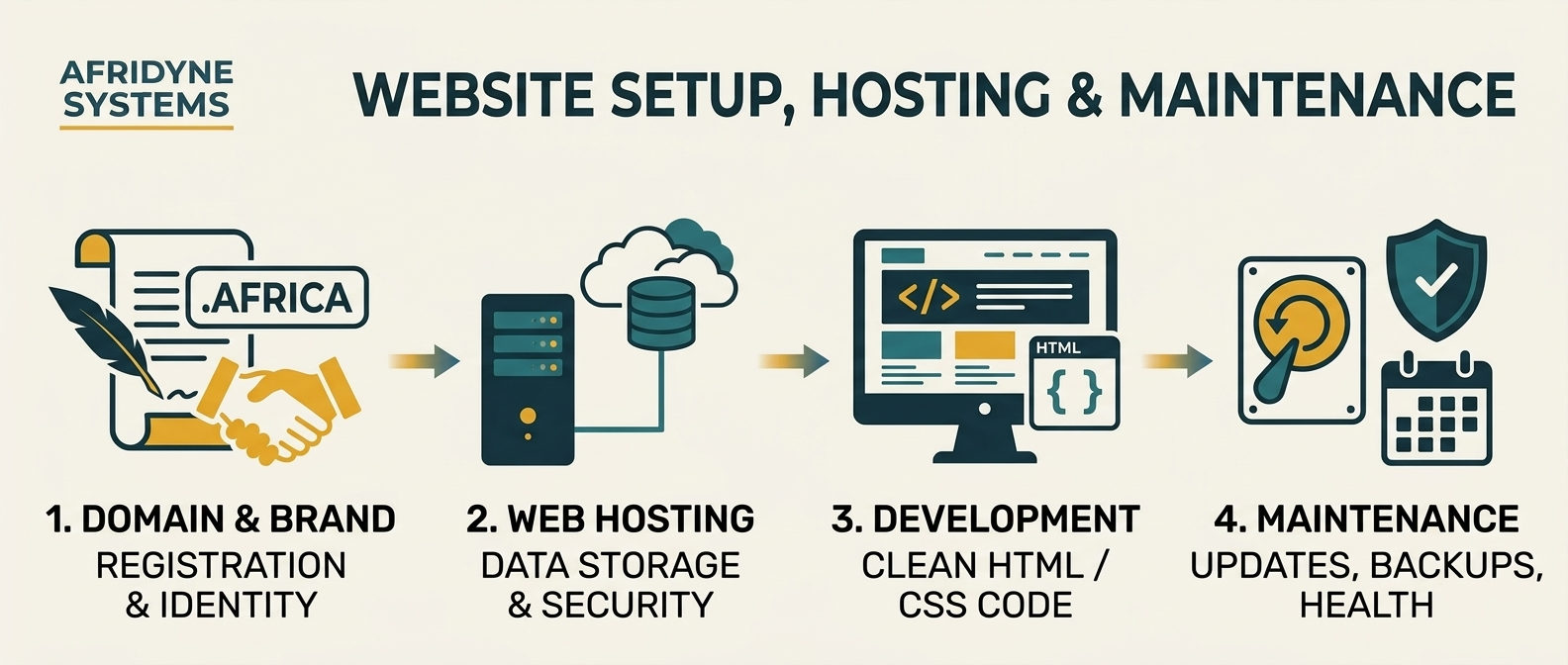
1. The four parts of a website
| Part | What it is | Renews | If it lapses |
|---|---|---|---|
| Domain name | Your address, such as yourbusiness.co.za. It is registered through a registrar and should be in your name. | Yearly or as registered. The registrar sends reminders by email. | The site and the email on that domain both stop working. |
| Hosting | The rented server space where the site files live and from which they are served. | Monthly or yearly, depending on the provider. | The site goes offline, and email hosted there may stop too. |
| The site | The pages, images and forms that visitors see. | Does not expire, but needs the occasional change. | Content goes out of date, forms may stop working. |
| Mailboxes on your domain. See our business email guide. | With hosting, or per user for Microsoft 365 or Google Workspace. | Mail bounces or is lost. |
The reminders about domain and hosting renewals go to whichever contact email is on file. If that is an old address nobody reads, renewals get missed. Check it once a year.
2. What we build
We build in plain HTML, CSS and JavaScript, the same way as our own site, and we also build Markdown-based documentation sites. Both are what are called static sites: the pages are ready-made files, with no database underneath.
| Plain HTML, CSS and JavaScript site | Markdown documentation site | |
|---|---|---|
| Best for | Business sites: a handful of pages describing what you do, with contact details and a quote form. | Large collections of guides, procedures and how-to pages that grow over time. |
| How it is made | Pages are written and styled by hand, then uploaded to your hosting. | Pages are written as simple text files that are converted into a searchable website, then published. |
| Where it lives | Normal web hosting (cPanel). | Normal web hosting, or a free publishing service for documentation that needs no forms. |
| Upkeep | Very little: edit a page when something changes. | Add or edit text files, and republish. |
Why static sites suit a small business
- Fast. Pages are served as they are, with nothing to build on every visit.
- Few things to break. No database and no plug-ins means no constant stream of updates to install and fewer ways to get hacked.
- Cheap to host, easy to move. The whole site is a folder of files, so it can be copied to another host in minutes.
- Easy to back up. A copy of the folder is a complete backup.
Forms and email: a static site cannot send email by itself, so a quote or contact form needs a small script on the server that sends the message from your own domain. We set that up and test it. It should never open the visitor’s own mail program.
If you already have a website built on something else, tell us what it runs on before you send any access details. We will say whether we can look after it, or whether it needs a rebuild.
3. Domain and hosting
Domain name
- Register it in the business’s name, with a contact email you control. Whoever is listed owns the domain, so do not let a designer or an ex-employee be the owner of record.
- Keep it short and easy to say. Avoid hyphens and numbers if you can, and check it is not too close to a competitor’s name.
- Renewals. Registrars normally email reminders ahead of expiry. Put the renewal date in your diary as well, and renew early. A lapsed domain takes the website and every email address on it down at once.
- If you do not yet have a domain, we collect the details we need, register it for you and hand over the login.
Hosting
- For most small business sites, ordinary shared cPanel hosting is plenty. We recommend it to clients who do not already have hosting, and we help choose a package. Contact us for pricing.
- If you already have hosting, we work with your provider. We only need the right access (see section 7) and we do not need to move you.
- Good signs in a host: a local or well-reviewed provider, free automatic SSL (the padlock), regular backups, a clear support line, and a control panel you can log in to yourself.
- Hosting and email. If your email is on the same hosting, a hosting problem can take email down too. That is one reason some businesses put email on Microsoft 365 or Google Workspace.
Where DNS is managed: the DNS records (the settings that point your domain to the site and to email) are managed either at your registrar or at your host. Knowing which is important: records added in the wrong place do nothing. We check this at the start of every job.
4. How we set a site up
- Plan. What the site must do, which pages it needs, what you want visitors to do, and which photos and text exist already.
- Domain and hosting. We register the domain and set up hosting, or work with the ones you have.
- Design and build. A clean design that works on phones as well as computers, written in plain HTML, CSS and JavaScript.
- Email and forms. Mailboxes created, contact or quote form connected to your own domain, and everything tested.
- Test and launch. We check every page on a phone and a computer, check the padlock and the form, then publish.
- Get found. A sitemap and basic search settings so Google can find the pages, and a business profile for local searches.
- Hand over. A short summary of what lives where, who the registrar and host are, when things renew, and where the backup is kept.
5. Keeping it healthy
A static site needs very little, but it does need looking at. This is the checklist we use. Doing it monthly takes about fifteen minutes.
| Check | How often | What to do |
|---|---|---|
| Does the site load? | Monthly | Open it on a phone using mobile data, not your own Wi-Fi, and click through every main page. |
| The padlock | Monthly | The address should show a padlock with no warnings. The certificate normally renews by itself. A warning means it did not. |
| Quote and contact forms | Monthly | Send a test and confirm it arrives. Forms can fail without anyone noticing. |
| Contact details and content | Monthly | Phone, email, hours and services must still be right. Out-of-date details lose customers. |
| Email on your domain | Monthly | Send to and from the main address, and check for full mailboxes. |
| A backup copy | After every change, and every few months | Keep a complete copy of the site folder away from the host. A host’s own backups are a bonus, not a plan. |
| Renewal dates | Quarterly | Check when the domain and the hosting renew and that the reminders go to an address someone reads. |
| Passwords and access | Yearly, and when anyone leaves | Change passwords for hosting and the registrar, and remove access for anyone who no longer needs it. |
6. If the site is down
Work through these in order. They are quick, and they tell us (or your host) exactly where to look.
| Check | What you see | What to do |
|---|---|---|
| 1. Is it down for everyone? | It loads on your phone using mobile data but not on your Wi-Fi. | The problem is your own internet, not the site. |
| 2. Has the domain expired? | A page from your registrar or a parking page, or “this site can’t be reached”. | Check the registrar for the expiry date and renew straight away. Check the contact email for missed reminders. |
| 3. Is the hosting account active? | A suspended or “account disabled” page. | Unpaid invoice or over a usage limit. Contact the host. |
| 4. Is it the certificate? | A “not secure” or “connection not private” warning. | The certificate did not renew. Ask the host to run their automatic certificate check, or send us the screenshot. |
| 5. Did something just change? | A “500 error” or blank page straight after an upload or edit. | A faulty file or setting is the usual cause. Undo the last change, or put back the last good copy. |
| 6. Was DNS changed? | The site or email stopped after a change to nameservers or records. | Changes can take up to a day or two to settle. If it does not, check the records are in the right place. |
| 7. Still stuck? | None of the above. | Send us a screenshot, the exact address you typed and what changed recently. |
7. What we need from you
- Starting from scratch: your business details, what you want on the site, photos and logos you already have, and the details needed to register a domain.
- Maintenance or updates on an existing site: admin access to the hosting control panel, and to the registrar if domain or DNS changes are needed. Please tell us who your host and registrar are.
- Sharing access safely: where your host allows it, create a separate login for us instead of giving out the main account password. Change the password once the work is done, and never send passwords in the same message as the account address.
Send us a short description of what you need, and what you already have (domain, hosting, email), and we will tell you what is involved. Contact us for pricing.
 Chat on WhatsApp